Widescreen HDTV still show black bars!!!

ZiNg31

New Member
Joined
Feb 1, 2005
Messages
1,230
Reaction score
0
I realized that when playing Aspect ratio: 2.35:1/2.40:1 on HDTV still show black bars on top and bottom. Aspect ratio: 1.85:1 will show full wide screen on HDTVs. I was exciting about bars gonna be removed playing widescreens on my HDTV but learned it does not remove bars on whole widescreen format movies. SUCKS! Which mean there will be new HDTV in the future for Aspect ratio: 2.35:1/2.40:1 ? Which that would stretch the future HDTV more wider!!!

Why dont they invent Circle HDTV? Since all cameras lens are circle? Heh.
 
I realized that when playing Aspect ratio: 2.35:1/2.40:1 on HDTV still show black bars on top and bottom. Aspect ratio: 1.85:1 will show full wide screen on HDTVs. I was exciting about bars gonna be removed playing widescreens on my HDTV but learned it does not remove bars on whole widescreen format movies. SUCKS! Which mean there will be new HDTV in the future for Aspect ratio: 2.35:1/2.40:1 ? Which that would stretch the future HDTV more wider!!!

Why dont they invent Circle HDTV? Since all cameras lens are circle? Heh.

Well, most movies are presented in 2.35:1 while most TV series today are shown in 1.78:1.

So that's basically why. You'll get used to it. If not, then I can't help you.
 
I realized that when playing Aspect ratio: 2.35:1/2.40:1 on HDTV still show black bars on top and bottom. Aspect ratio: 1.85:1 will show full wide screen on HDTVs. I was exciting about bars gonna be removed playing widescreens on my HDTV but learned it does not remove bars on whole widescreen format movies. SUCKS! Which mean there will be new HDTV in the future for Aspect ratio: 2.35:1/2.40:1 ? Which that would stretch the future HDTV more wider!!!

Why dont they invent Circle HDTV? Since all cameras lens are circle? Heh.

It's not big deal since most movies that made after 1950's are filmed in 2:35:1/2:40:1 but better than when you watch movies on SDTV with 4:3 then bulky black bars on top and bottom, even worse than HDTV with 16:9. In long time ago, numerous of movies on VHS are fullscreen since they use scan and pan to chopped 45% of picture from side of film.

I just got usually with black bars. :)
 
I realized that when playing Aspect ratio: 2.35:1/2.40:1 on HDTV still show black bars on top and bottom. Aspect ratio: 1.85:1 will show full wide screen on HDTVs. I was exciting about bars gonna be removed playing widescreens on my HDTV but learned it does not remove bars on whole widescreen format movies. SUCKS! Which mean there will be new HDTV in the future for Aspect ratio: 2.35:1/2.40:1 ? Which that would stretch the future HDTV more wider!!!

Why dont they invent Circle HDTV? Since all cameras lens are circle? Heh.


Easy, Use FILL option. You won't see black bar anymore but sides will get cut out. No matter what kind HDTV you use. Almost all widescreen movies are not 16:9.

CCD or CMOS are not circle. Did you know that?
 
Easy, Use FILL option. You won't see black bar anymore but sides will get cut out. No matter what kind HDTV you use. Almost all widescreen movies are not 16:9.

CCD or CMOS are not circle. Did you know that?

Yup, that what PS3 offers for DVD but impossible for BD movies.

Zing, Go to menu on remote or controller and change the image quality into "fullscreen" for DVD then black bars on top and bottom will be lifted but other sides would be lifted too to make fit in 16:9. For BD movies, I haven't experiment on BD movies.
 
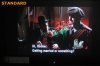
I have several complain about black bar on top/bottom.

on 1st example, I didn't setup anything on both DVD player and HDTV. It show black on all side.

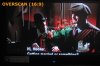
On 2nd example, when I use overscan from HDTV's display setup, the movie's pan to fit as possible in display as it look good. Unfortunately the subtitle being cut nearly half. It's because The String doesn't support CC but subtitle, only. I guess that could be studio's decide.

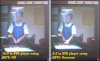
On 3rd example, after talk with two dorks, I haven't thought of setup on DVD player. So, I change from 4:3 to 16:9 under DVD player. It appear funny hozion and change "Fill" to stretch to fill whole display, and it become very nice looking.

On 4th example, I decide to compare between with 3rd example, as I can see the both side being chop a little. Notice that?
 

Attachments

  • hdtv_dvd_standard.jpg
    hdtv_dvd_standard.jpg
    43.9 KB · Views: 13
  • hdtv_dvd_overscan.jpg
    hdtv_dvd_overscan.jpg
    50.4 KB · Views: 11
  • hdtv_dvd_169.jpg
    hdtv_dvd_169.jpg
    49.7 KB · Views: 10
Yup, that what PS3 offers for DVD but impossible for BD movies.

Zing, Go to menu on remote or controller and change the image quality into "fullscreen" for DVD then black bars on top and bottom will be lifted but other sides would be lifted too to make fit in 16:9. For BD movies, I haven't experiment on BD movies.

Yeah I only watch blu ray movies on my pS3 and that what I were speaking relating to my topic here. As for DVD I use my standard TV with my dvd player because DVD movies from rental has stratches on disc... I am not trusting them in my PS3 and damage it. I have one copy of DVD with no stratches and tried it on PS3 it looks good with my HDTV the movie is "Childern of lesser god".

So I figures there is no way to get black bars removed when movies are in 2.35/2.40 aspect ratio playing on HDTVs. I had to zoom in to get the bars out but it cut left and right sides off when I do this on my HDTV.
 
So I figures there is no way to get black bars removed when movies are in 2.35/2.40 aspect ratio playing on HDTVs. I had to zoom in to get the bars out but it cut left and right sides off when I do this on my HDTV.

Keep on watching movies in their original aspect ratio and you will become accustomed to it eventually. I've been watching widescreen movies for many years. I even watched movies in widescreen on VHS. It's always better to watch movies in their original aspect ratio. Especially movies like 'Lord of the Rings', 'Ben-Hur' and many more.

People aren't missing anything when they watch movies in their original aspect ratio. You're not seeing less, you're seeing more of the movie.
 
Keep on watching movies in their original aspect ratio and you will become accustomed to it eventually. I've been watching widescreen movies for many years. I even watched movies in widescreen on VHS. It's always better to watch movies in their original aspect ratio. Especially movies like 'Lord of the Rings', 'Ben-Hur' and many more.

People aren't missing anything when they watch movies in their original aspect ratio. You're not seeing less, you're seeing more of the movie.

Yeah I dont mind watching with black bars but the point is my Samsung manual said if I let the black bars stay still for over 2 hours it will cause the screen burn in. everytime I play movies with bars when it get near to 2 hours I click to return to menu where it show full screen and then go back and play. My HDTV is new and cost me 4,000 dollars and you know how I feel worrying about that burn in screen. It also said do not use any still image on same area for over 2 hours. Like for example every TV channels has their own logo on bottom right corner and it stay there during the whole show... lucky it go away during commerical to avoid 2 hours burn in screen.
 
Yeah I dont mind watching with black bars but the point is my Samsung manual said if I let the black bars stay still for over 2 hours it will cause the screen burn in. everytime I play movies with bars when it get near to 2 hours I click to return to menu where it show full screen and then go back and play. My HDTV is new and cost me 4,000 dollars and you know how I feel worrying about that burn in screen. It also said do not use any still image on same area for over 2 hours. Like for example every TV channels has their own logo on bottom right corner and it stay there during the whole show... lucky it go away during commerical to avoid 2 hours burn in screen.

Does your HDTV is plasma? If you have LCD HDTV then you would never get burn in screen.
 
Yeah I dont mind watching with black bars but the point is my Samsung manual said if I let the black bars stay still for over 2 hours it will cause the screen burn in. everytime I play movies with bars when it get near to 2 hours I click to return to menu where it show full screen and then go back and play. My HDTV is new and cost me 4,000 dollars and you know how I feel worrying about that burn in screen. It also said do not use any still image on same area for over 2 hours. Like for example every TV channels has their own logo on bottom right corner and it stay there during the whole show... lucky it go away during commerical to avoid 2 hours burn in screen.

How old of Plasma you have?

Don't you know many new plasma manufacturers have installed anti-burn setting have anti-burn screen?

LCD never happen for burn.

Again, I told you to use FILL option for screen.
 
It is 46" Samsung LCD HDTV. It came out few months ago. It's new less than 2 months old. The manual say it can cause the burn in if still image stay there for over 2 hours. I know Plasma do cause the burn in really easy. This link is my TV

SAMSUNG's Digital World - LCD TV | LN-T4661F

b2c_m_lnt4661.jpg
 
It is 46" Samsung LCD HDTV. It came out few months ago. It's new less than 2 months old. The manual say it can cause the burn in if still image stay there for over 2 hours. I know Plasma do cause the burn in really easy. This link is my TV

SAMSUNG's Digital World - LCD TV | LN-T4661F

b2c_m_lnt4661.jpg

You shouldn't really worry about burn-in. Plasma is much worse for that. They only put that down as a "pre-caution".

I've watched a lot of movies on my HDTV (LCD) and there's still no burn-in. :-/
 
You shouldn't really worry about burn-in. Plasma is much worse for that. They only put that down as a "pre-caution".

I've watched a lot of movies on my HDTV (LCD) and there's still no burn-in. :-/
he mean "still image" not moving image.

If he was to use his tv to browse his picture gallery and left one picture on all day without letting screensaver kicking in. Then there will some burn-in. If that tv has screensaver feature then that's great.
 
he mean "still image" not moving image.

If he was to use his tv to browse his picture gallery and left one picture on all day without letting screensaver kicking in. Then there will some burn-in. If that tv has screensaver feature then that's great.

He's talking about widescreen movies in 2.35:1. Movies in 2.35:1 show black bars through the whole movie. That's what he's concerned about because they are black the whole time.

But images, that's a different story. However, it's still less of a risk on LCD TV than it is with Plasma TV. A much less risk. I would know, I use a LCD HDTV as my monitor and there's still no burn-in. It's just there in the book to protect itself from lawsuits. But it's still listed as a risk because it is possible it could happen. If you leave your TV on long enough, like for hours or a day... it can happen.
 
He's talking about widescreen movies in 2.35:1. Movies in 2.35:1 show black bars through the whole movie. That's what he's concerned about because they are black the whole time.

But images, that's a different story. However, it's still less of a risk on LCD TV than it is with Plasma TV. A much less risk. I would know, I use a LCD HDTV as my monitor and there's still no burn-in. It's just there in the book to protect itself from lawsuits. But it's still listed as a risk because it is possible it could happen. If you leave your TV on long enough, like for hours or a day... it can happen.
right,
black doesn't cause burn-in on any tv. only white or colored does. because black is "off"
 
Damn, a $4k HDTV, LCD? It better have 1080p enabled.
I own a 31' wide Samsung thatis 720p, and it cost me $700, which is nothing compared to 4 grand!
 
Back
Top