MsGiglz
New Member
- Joined
- Apr 24, 2003
- Messages
- 4,236
- Reaction score
- 0
Katzie said:Can I help it when I had too much fun with mine?
wooohoo!!!!.. so fancy!! you go gurl!!!


Katzie said:Can I help it when I had too much fun with mine?
MsGiglz said:ah.. hes cheating.. he have those "pencil -like mouse"
hehe
jk


Banjo said:Hee, nope... I'm using a Gyration wireless ultra-mouse.
Plus, I'm a graphic designer so that's an advantage for me.

Banjo said:Hee, nope... I'm using a Gyration wireless ultra-mouse.
Plus, I'm a graphic designer so that's an advantage for me.
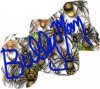
 Wrote my name.. it's really interesting!!
 Katzie said:Can I help it when I had too much fun with mine?
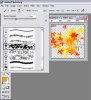
Katzie said:Hehehe Thanks Deaf258! I did this on Photoshop 7... click new and make transparent or white image for 400x200 in megapixel and set for 72 dpi. Go to brush tools and you'll see brush that comes in different sizes of circle, well if you scroll all the way down you'll see some really cool funky brushes like tall grasses, leaves, stars, sponges and the like. Select "leaves" and make the color in orange then use the brush to go all over the image to get as many leaves as you want. It does add on different colors, too! This has some really cool effect. See photo below to get an idea.
Deaf258 said:Interesting, I made a bunch of brushes with that kind of effect!! Let me know how I can IM you thru AIM or MSN so I could send you what I made and you can use my brushes if you like them enough!
 Just PM'd you!
WaterRats13 said:Just couldnt' resist having another go at writing my handle ID heheheh.....

 ???
???