how do you know linxus or Centos

Smithtr

G.G.H.T
Premium Member
Joined
Jun 5, 2006
Messages
16,217
Reaction score
18
who is experience how do you know linux or command, I can't search find because reason Centos or Linxus belong to probably issues on commad

who is expertment to how system manager linux or something

I ask you question simply I research find information!

I am pretty aware complication!
 
Download Ubuntu. It's #1 linux. It is easy to use and all you need to download it then burn it to cd using ISO burner OR you can use blank 2 or 4 GB USB thumbdrive and install Ubuntu to thumbdrive. After that you can plug in USB thumbdrive and boot up computer or laptop. It'll load Linux that you don't have to lose Windows. It'll run on memory and you will be able to navigate Ubuntu.

go to www.ubuntu.com and click download. It's currently 11.04 version. Lot better than previous version. Pretty soon it'll be 11.10 in few month of relese.

Last thing, You can even install Ubuntu inside Windows so that when you boot up computer, you'll see selection "Windows" and "Ubuntu". This will allow you to choose which OS you want to use. If you don't like Ubuntu, Boot to Windows and you go to Add/Remove program and delete Ubuntu from list. It'll go back to normal Windows bootup after that.

Current Ubuntu don't use much commands. It only need just tiny bit. I am Linux user and have experience. I'm not the expert but average user. I've done commands often in the past to fix the program. Right now it's lot less and more of GUI.

Catty
Any Questions?

 
Download Ubuntu. It's #1 linux. It is easy to use and all you need to download it then burn it to cd using ISO burner OR you can use blank 2 or 4 GB USB thumbdrive and install Ubuntu to thumbdrive. After that you can plug in USB thumbdrive and boot up computer or laptop. It'll load Linux that you don't have to lose Windows. It'll run on memory and you will be able to navigate Ubuntu.

go to Homepage | Ubuntu and click download. It's currently 11.04 version. Lot better than previous version. Pretty soon it'll be 11.10 in few month of relese.

Last thing, You can even install Ubuntu inside Windows so that when you boot up computer, you'll see selection "Windows" and "Ubuntu". This will allow you to choose which OS you want to use. If you don't like Ubuntu, Boot to Windows and you go to Add/Remove program and delete Ubuntu from list. It'll go back to normal Windows bootup after that.

Current Ubuntu don't use much commands. It only need just tiny bit. I am Linux user and have experience. I'm not the expert but average user. I've done commands often in the past to fix the program. Right now it's lot less and more of GUI.

Catty
Any Questions?


Thank you so much appreciate to explain to! I aware it It is very complication!

I will find out someone expert to command!
 
Thank you so much appreciate to explain to! I aware it It is very complication!

I will find out someone expert to command!

If you go to Homepage | Ubuntu and click "download". you will find several options to download. I downloads "Wubi" to install inside Windows. It is very easy.

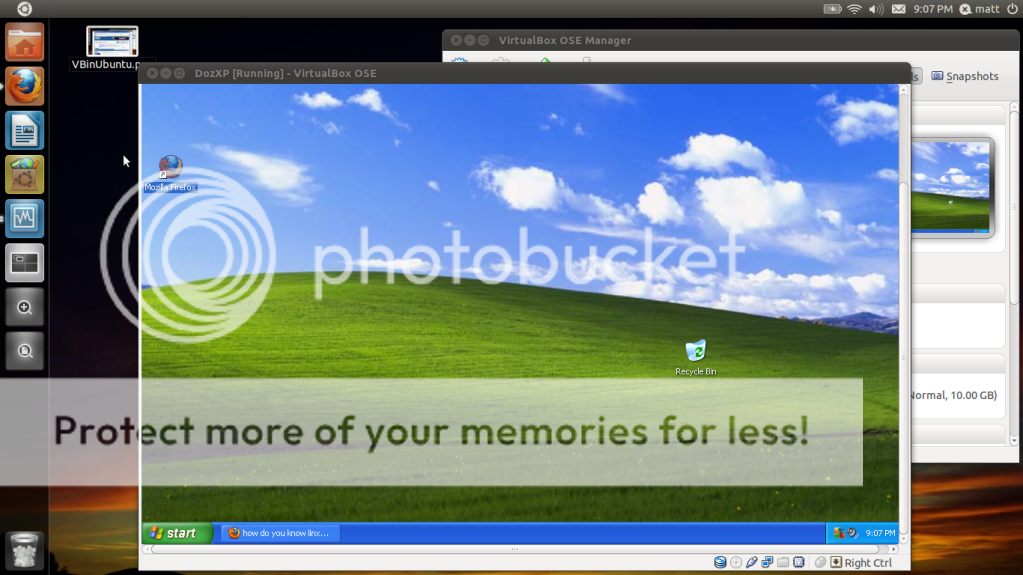
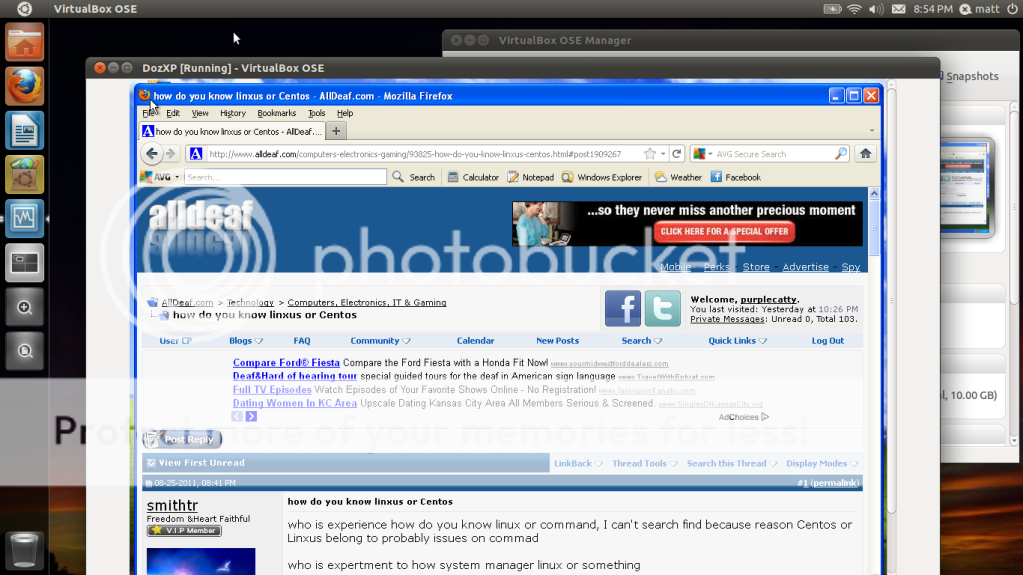
Currently, I am on Ubuntu 11.04 on Acer Aspire notebook (NOT NETBOOK!!) and recently installed VirtualBox. I ran VB and installed Windows XP in virtual machine. I am currently on VM because I wanted to watch Netflix in Linux but it won't run Netflix because of Silverlight (moonlight for linix) won't run due to DRM reason (stupid Netflix. one of CEO was former M$ employee!! that explains why he chose M$ Silverlight instead of flashplayer). So when I need to use Windows, I don't have to reboot and switch over to Windows. Just run VB to run Windows inside Linux :lol:

So Instead of struggle on getting Netflix working on Linux, I use VirtualBox to run Windows XP and able to watch movie while on Ubuntu. That irony tho.

You can simply install Ubuntu then worry about the code. To learn how to use code, You can run Ubuntu's Terminal and fiddle around with it.

windowsinlinux-1.png


VBinUbuntu.png


Catty
 
I'm taking IT classes in college right now. I've used Linux for many years.

I agree. For the average computer user who just wants a working system to browse the web, look at email, etc, Ubuntu is the best distribution for that.
 
Currently, I am on Ubuntu 11.04 on Acer Aspire notebook (NOT NETBOOK!!) and recently installed VirtualBox. I ran VB and installed Windows XP in virtual machine. I am currently on VM because I wanted to watch Netflix in Linux but it won't run Netflix because of Silverlight (moonlight for linix) won't run due to DRM reason (stupid Netflix. one of CEO was former M$ employee!! that explains why he chose M$ Silverlight instead of flashplayer). So when I need to use Windows, I don't have to reboot and switch over to Windows. Just run VB to run Windows inside Linux :lol:

Great solution! Nice! :cheers:
 
Great solution! Nice! :cheers:

:cheers: too!!

I have a minor problem with VB. My laptop 12" screen have 1366x768 resolution and it's HD monitor. The VB running on XP seem like it's thinking it's on old monitor which is bigger than my laptop's screen (I even switched XP's screen resolution from 1020x768 all the way to 1260x1020, VB's window just just resize it with scroll bar still leaving XP showing 3/4). The VB window don't show fully XP screen, just 3/4 of the XP. I had to use Right CTL button to exit mouse from XP then scroll on VB screen. I did full screen but no help. I recalled I use VMware 6 for Linux that I was able to get XP automatically fit in screen without scrollbar on VMware window. VB don't have that option as I checked through "Display" option. Any suggestion?

Catty
 
If you go to Homepage | Ubuntu and click "download". you will find several options to download. I downloads "Wubi" to install inside Windows. It is very easy.

Currently, I am on Ubuntu 11.04 on Acer Aspire notebook (NOT NETBOOK!!) and recently installed VirtualBox. I ran VB and installed Windows XP in virtual machine. I am currently on VM because I wanted to watch Netflix in Linux but it won't run Netflix because of Silverlight (moonlight for linix) won't run due to DRM reason (stupid Netflix. one of CEO was former M$ employee!! that explains why he chose M$ Silverlight instead of flashplayer). So when I need to use Windows, I don't have to reboot and switch over to Windows. Just run VB to run Windows inside Linux :lol:

So Instead of struggle on getting Netflix working on Linux, I use VirtualBox to run Windows XP and able to watch movie while on Ubuntu. That irony tho.

You can simply install Ubuntu then worry about the code. To learn how to use code, You can run Ubuntu's Terminal and fiddle around with it.

windowsinlinux-1.png


VBinUbuntu.png


Catty


That is good job I interesting love on linux is very fast :)
Great solution! Nice! :cheers:
me too I know good job Catty
:cheers: too!!

I have a minor problem with VB. My laptop 12" screen have 1366x768 resolution and it's HD monitor. The VB running on XP seem like it's thinking it's on old monitor which is bigger than my laptop's screen (I even switched XP's screen resolution from 1020x768 all the way to 1260x1020, VB's window just just resize it with scroll bar still leaving XP showing 3/4). The VB window don't show fully XP screen, just 3/4 of the XP. I had to use Right CTL button to exit mouse from XP then scroll on VB screen. I did full screen but no help. I recalled I use VMware 6 for Linux that I was able to get XP automatically fit in screen without scrollbar on VMware window. VB don't have that option as I checked through "Display" option. Any suggestion?

Catty


Thank you so much reading pretty information interesting :P
 
Back
Top